5. Data Representation Sound
5. Data Representation Sound
Storing sound in a digital form
Sound is captured – usually by a microphone – and then converted into a digital signal. Computers work in binary. All data must be converted into binary in order for a computer to process it.
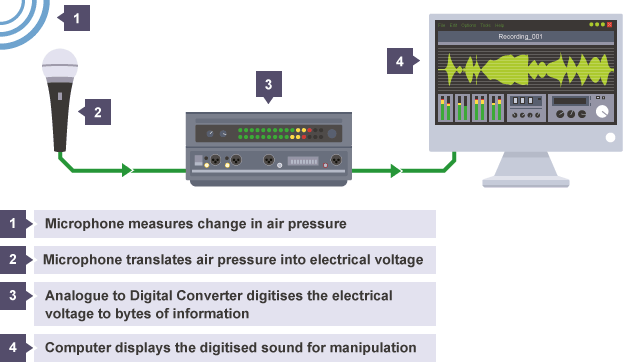
Storing sound in a digital form
- Sample rate is the number of samples recorded in any given period of time. The higher the sample rate, the closer the recorded signal is to the original (more accurate representation). Sample rate is measured in hertz. The higher the sample rate the larger the file sizer
- Bit depth refers to the number of bits used to record each sample. The higher the bit depth, the higher the quality of the audio. Bit depth is usually 16 bits on a CD and 24 bits on a DVD. Each sample represents the amplitude of the digital signal at a specific point in time. The amplitude is stored as either an integer or a floating point number and encoded as a binary number.
- Bit rate is simply a measure of how much data is processed for each second of sound. As with sample rate, the higher the bit rate, the better quality of the recorded sound. Bit rates are usually measured in kilobits per second (kbps).
- List Item
Calculating the size of an audio file
- Channels allow audio to be outputted using different effects. This creates a different listening experience for the audience. (for example – surround sound or stereo effects). This impacts on the overall file size.
Example 1 – File length with a single channel
A typical, uncompressed high-quality audio file has a sample rate of 44,100 samples per second, a bit depth (the number of bits available for each sample) of 16 bits per sample. The bit rate for this file would be:
44,100 samples per second × 16 bits per sample = 705,600 bits per second
What would file size be for a three minute song?
3 x 60 = 180
705,600 x 180 = 127,008,000
Example 2 – Channels
A typical, uncompressed high-quality audio file has a sample rate of 44,100 samples per second, a bit depth (the number of bits available for each sample) of 16 bits per sample and 2 channels of stereo audio. The bit rate for this file would be:
44,100 samples per second × 16 bits per sample × 2 channels = 1,411,200 bits per second
What would file size be for a four minute song?
A four-minute (240 second) song at this bit rate would create a file size of:
14,411,200 × 240 = 338,688,000 bits (or 40.37 megabytes)
Devlop Further
| Source | Link |
|---|---|
| BBC Bite Size | https://www.bbc.com/bitesize/guides/zfspfcw/revision/9 |
| Craig N Dave | https://student.craigndave.org/videos/ocr-gcse-slr2-6-compression |
Quiz Summary
0 of 6 Questions completed
Questions:
Information
You have already completed the quiz before. Hence you can not start it again.
Quiz is loading…
You must sign in or sign up to start the quiz.
You must first complete the following:
Results
Results
0 of 6 Questions answered correctly
Your time:
Time has elapsed
You have reached 0 of 0 point(s), (0)
Earned Point(s): 0 of 0, (0)
0 Essay(s) Pending (Possible Point(s): 0)
| Average score |
|
| Your score |
|
Categories
- Data Representation: Sound 0%
| Pos. | Name | Entered on | Points | Result |
|---|---|---|---|---|
| Table is loading | ||||
| No data available | ||||
- Review / Skip
- Answered
- Correct
- Incorrect
-
Question 1 of 6
1. Question
Grading can be reviewed and adjusted.Grading can be reviewed and adjusted. -
Question 2 of 6
2. Question
Grading can be reviewed and adjusted.Grading can be reviewed and adjusted. -
Question 3 of 6
3. Question
Correct / 8 PointsIncorrect / 8 Points -
Question 4 of 6
4. Question
Correct / 3 PointsIncorrect / 3 Points -
Question 5 of 6
5. Question
Correct / 2 PointsIncorrect / 2 Points -
Question 6 of 6
6. Question
Grading can be reviewed and adjusted.Grading can be reviewed and adjusted.